CSS CSS float 속성 - 위치 지정
페이지 정보

작성자 모던DS
조회 176회
조회 176회
본문
CSS float 속성
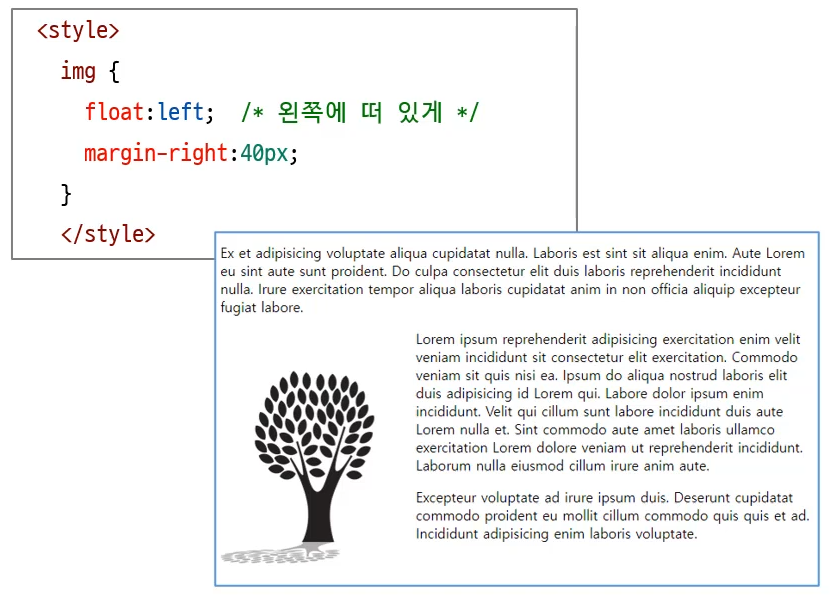
float 속성은 본래 이미지 주위로 텍스트를 자연스럽게 흐르게 하기 위해 도입되었으나, 과거에는 전체 웹 레이아웃을 잡는 주요 수단으로 사용되었습니다.
현재는 Flex나 Grid에 밀려 특수한 목적으로만 주로 사용됩니다.
주요 속성값
none: 기본값으로, 요소를 띄우지 않습니다.
left: 요소를 부모 요소의 왼쪽에 배치하며, 뒤에 오는 요소들이 그 오른쪽을 감쌉니다.
right: 요소를 부모 요소의 오른쪽에 배치하며, 뒤에 오는 요소들이 그 왼쪽을 감쌉니다.
inline-start / inline-end: 글쓰기 방향(LTR/RTL)에 따라 왼쪽 또는 오른쪽으로 자동 결정됩니다.
float 해제 (Clearfix)
float을 사용하면 부모 요소가 자식 요소의 높이를 인식하지 못해 무너지는 현상이 발생합니다. 이를 해결하기 위해 clear 속성이나 가상 요소를 활용합니다.
clear:
left,right,both값을 사용하여 float의 영향을 받지 않도록 설정합니다.Overflow: 부모 요소에
overflow: hidden또는auto를 주어 높이를 강제로 계산하게 합니다.
HTML
<!DOCTYPE html>
<html lang="ko">
<head>
<meta charset="UTF-8">
<title>박스모델</title>
<style>
.wrapper {
width: 800px;
margin: 10px auto;
padding: 20px;
border: 1px solid #ccc;
}
.sidebar {
width: 150px;
height: 150px;
}
#left{
background:#ffd800;
float: left;
margin-right: 10px;
}
#right {
background: #0094ff;
float: right;
margin-left: 10px;
}
/* clear 속성을 사용해 플로팅 해제하기 */
.clear {
clear: both;
padding-top: 20px;
}
</style>
</head>
<body>
<div class="wrapper">
<div class="sidebar" id="left">사이드바</div>
<div class="sidebar" id="right">사이드바</div>
<p>Lorem, ipsum dolor sit amet consectetur adipisicing elit. Maxime, deserunt. Lorem ipsum dolor sit amet. Lorem ipsum dolor sit amet.</p>
<p class="clear">Lorem ipsum dolor sit amet consectetur adipisicing elit. Quia totam animi delectus nesciunt. Minus accusamus consequuntur inventore fugit culpa reiciendis dicta aliquam.</p>
</div>
</body>
</html>
- 이전글CSS position 속성 - 위치 지정 26.02.26
- 다음글CSS display 속성 - 위치 지정 26.02.26